
Breathedge 2 Survival Bonuses: The 60–80% Food, Water & Rest Range
Updated · Breathedge 2 Wiki
The three meter-based bonuses activate from 60% through 80%, including both endpoints. Well nourished slows hunger drain by 30%, Fully hydrated slows fatigue drain by 20%, and Fully rested raises movement speed by 20%. Each uses its own meter; being at 100% is outside this particular bonus range.
Bonus thresholds and individual numerical effects: Steam Build 25584330, October 4, 2026. Percentages refer to each meter’s current maximum. Temporary food and drink effects are separate bonuses.
In this guide
Match the bonus to the correct meter
| Meter remaining | Bonus | Active range | Numerical benefit |
|---|---|---|---|
| Satiety | Well nourished | 60% ≤ meter ≤ 80% | Hunger drain −30% |
| Hydration | Fully hydrated | 60% ≤ meter ≤ 80% | Fatigue drain −20% |
| Rest / stamina | Fully rested | 60% ≤ meter ≤ 80% | Movement speed +20% |
Well nourished uses satiety, Fully hydrated uses hydration, and Fully rested uses remaining rest or stamina. The rest meter is the resource you replenish by resting, not a percentage describing how tired you feel.
A qualifying hydration meter can provide its benefit even if your food meter is outside the range. There is no requirement in this table to align all three before any one of them can help.
Both 60% and 80% count
| Remaining meter | In the bonus range? | Meaning |
|---|---|---|
| 59.9 | No | Below the lower bound |
| 60 | Yes | Lower bound included |
| 70 | Yes | Inside the range |
| 80 | Yes | Upper bound included |
| 80.1 | No | Above the upper bound |
The range uses percentages of the current maximum. If a meter’s maximum is 150, the same range is 90–120 points. Do not copy a 60-point food target from a 100-point example onto a different character maximum.
Above 80% simply means this range-based benefit is inactive. It does not establish that Overeating, Overhydration or Oversleep is already active; those are separate conditions. Read the HUD before treating a full meter as an emergency.
Choose the portion for the gap you need to fill
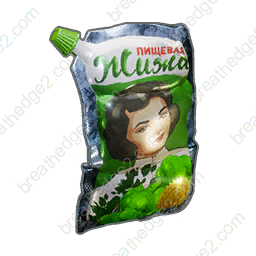
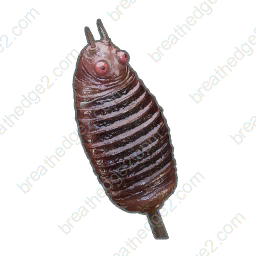
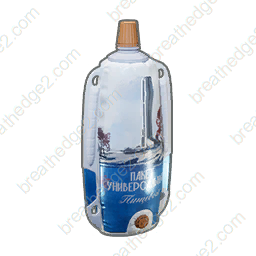
| Starting level | Supply | Base recovery | Result relative to 60–80 |
|---|---|---|---|
| 40 satiety | Nutrient pack | +25 satiety | 65: inside |
| 20 satiety | Oxyworm kebab | +60 satiety | 80: inside |
| 40 hydration | Bottle of water | +25 thirst | 65: inside |
| 60 hydration | Bottle of water | +25 thirst | 85: above |
These examples show why the largest recovery item is not always the best portion. Use the current meter and maximum, then choose a supply that covers the gap without automatically topping everything up.
The recovery numbers are base amounts. Meter drain, difficulty and other effects can change the observed result, so confirm the resulting status on your HUD. Carry extra supplies for later instead of consuming them all before departure.
Use the rest meter instead of sleeping for a guessed duration
Fully rested provides +20% movement speed while remaining rest or stamina is in the same 60–80% range. Rest changes that meter; follow the meter itself instead of assuming one fixed sleep duration works for every character.
Since 0.8.10, Esc or the gamepad Cancel button can interrupt sleep. End the rest when the meter reaches the level you want and confirm the bonus icon.
A movement bonus is not a cure for other warnings. If you remain overloaded or exhausted, those effects have their own recovery actions; this table does not promise that one positive percentage cancels one negative percentage.
Keep similarly named food bonuses separate
| Effect family | What keeps it active | Example |
|---|---|---|
| Meter range | The relevant meter stays between 60% and 80% | Well nourished, Fully hydrated, Fully rested |
| Timed food bonus | The displayed stage’s remaining duration | Satiety, Well Fed, Fully sated |
| Timed drink effect | The drink effect’s remaining duration | Stimulant or Adrenaline |
Well nourished is the satiety-range benefit. Well Fed is one of the separate timed food stages. Similar names do not mean they have the same duration, trigger or numerical effect.
The timed food guide lists 60-, 90- and 120-second stages; none of those durations is a countdown for the 60–80% meter bonuses. These range bonuses end when their corresponding meter leaves the range.
Make the range useful during an actual supply trip
Do not postpone urgent recovery just to optimize a bonus. When Starvation, Dehydration or a dangerous cold stage is active, address that condition first. The range is a preparation tool, not a reason to keep a depleted survival meter low.
- Check food, hydration and remaining rest before departure, using percentages of their current maximum.
- If a meter is below 60%, choose the appropriate food, drink or rest action. Check the item’s side effects as well as its recovery amount.
- If a meter is already above 80%, keep your next portion for later and let normal consumption bring it into the range.
- Check cold and overload before leaving. Faster drain or a heavy return load can change how long a useful bonus lasts.
- After recovery or consumption, confirm the active bonus name instead of assuming every green status is the same effect.
Sources and version notes
- RedRuins Softworks / Steam0.8.10 — Patch Notes
Continue with a useful guide
 ▶ Video chapters
Oxygen Stations & Oxyworms: Repairs and Refills
Compare public stations, portable oxygen stations and worm nests. Prepare repair supplies, battery cells and a route with places to refill.
Read the guide
Cold & Oxygen Drain: Chill, Frostbite and Hypothermia
Compare cold’s three oxygen multipliers, hunger drain and flight penalties, then choose warmth, supplies and suit upgrades before the return trip becomes an emergency.
Read the guide
Robots & Turrets: Triggers and Safe Approaches
Learn what alerts sentry turrets and patrol bots, why repair bots can shock you, and how garbage bots affect loose supplies.
Read the guide
Slow Movement: Overload, Fatigue & Food Bonuses
Find the six fatigue, overeating and overload penalties, the three carry-weight thresholds, and the food bonuses that help you prepare for a trip.
Read the guide