
Breathedge 2 Retrieve the Jammer: Depot Tools & Repair Materials
Updated · Breathedge 2 Wiki
For Retrieve the Jammer, prepare a working crowbar, a Spraytron with the appropriate alkaline supply, and materials for five separate repairs: the deputy’s device, wiring, and the bow, aft and side breaches. Identity checks, cleaning, the shuttle lid and launch controls remain separate journal interactions.
Tool and repair preparation: Steam Build 25584330, October 4, 2026. Progression advice uses official 0.8.7–0.8.11 fixes. This guide organizes the requirements by purpose; follow your active journal for the next interaction.
In this guide
Bring tools for the physical and cleaning objectives
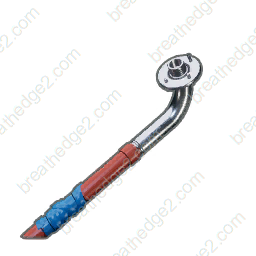
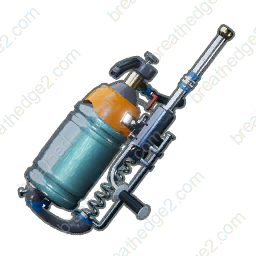
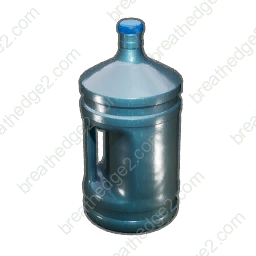
| Supply | Relevant objective | Preparation |
|---|---|---|
| Crowbar | Test the door’s durability; Help Babe with the Jammer | Keep it available for the task’s physical interactions |
| Spraytron | Clean the shuttle; flush out the larva | Check the tool and its supply before leaving |
| Alkaline solution | Fill the shuttle with alkaline solution | Treat filling separately from repairing the shuttle |
The door section includes power, contacts, ice and a durability check. A full bag of repair materials does not complete those interactions; use the prompt to identify whether you need power, an obstacle removed or a tool action.
The shuttle has both filling and cleaning objectives. Carrying repair materials alone is not enough to complete the Spraytron work. The filling objective points to Alkaline Moles in asteroids as a supply lead; compare the required interaction before spending your prepared alkaline supplies.
Keep the deputy device, wiring and three breaches separate
| Objective | Materials |
|---|---|
| Repair the deputy's device | 2 Aluminum, 2 Wires, 2 Electronics |
| Repair the wiring | 2 Electrical tape, 4 Wires |
| Repair the bow breach | 4 Refined metal, 3 Electronics, 4 Aluminum, 4 Fabric |
| Repair the aft breach | 2 Techbits, 4 Wires, 4 Plastic, 1 Electrical tape |
| Repair the side breach | 4 Metal, 4 Titanium, 4 Rubber, 2 Electrical tape |
The bow, aft and side breaches use different materials. The bow needs Refined metal, Electronics, Aluminum and Fabric; the aft needs Techbits, Wires, Plastic and tape; the side needs Metal, Titanium, Rubber and tape. Taking the bow’s list to every breach leaves gaps.
Wiring repair is also a separate target from the aft breach, even though both consume Wires. Use the individual plan when you only have one remaining prompt.
Use one combined budget before the repair sequence
| Material | Total |
|---|---|
| Aluminum | 6 |
| Wires | 10 |
| Electronics | 5 |
| Electrical tape | 5 |
| Refined metal | 4 |
| Fabric | 4 |
| Techbits | 2 |
| Plastic | 4 |
| Metal | 4 |
| Titanium | 4 |
| Rubber | 4 |
The total includes 10 Wires, 5 Electrical tape, 6 Aluminum and 5 Electronics across the five checks. These repeated materials are easy to underestimate when each repair is planned separately.
The combined target is useful before you complete any of these repairs. If some are finished, select only the remaining individual targets; remove the combined target from the same plan so nothing is counted twice.
Enter finished Techbits and Refined metal in inventory before expanding missing recipes. The table is the finished-material budget, while the planner works out which raw ingredients are still needed.
Treat identification as its own branch of the task
Pass verification, Inspect the deputy’s device, Find the head and Update profile are distinct objectives. Preparing the device’s 2 Aluminum, 2 Wires and 2 Electronics addresses its repair check, but does not replace the required identification interactions.
The stationmaster section includes a hose interaction and a later head objective. Use the journal and marker for the active object instead of searching for a different crafting ingredient when the task is asking for a person or identity step.
Hotfix 0.8.8 addresses saving during the station-chief explosion preventing the head from appearing. The 0.8.9 update restores the marker on the chief’s head after the body explodes. A missing object and a missing marker are different failures, so compare both fixes with the symptom in your save.
Repairing the shuttle does not fill, clean or launch it
| Prompt type | What a completed material plan does |
|---|---|
| Repair a breach or wiring | Provides the listed materials for that repair |
| Fill with alkaline solution | Does not complete the filling interaction |
| Clean with the Spraytron | Does not perform the cleaning action |
| Close the lid / Activate / Launch | Does not operate those controls |
Check the shuttle’s current prompt after each action. If the journal still asks for cleaning, buying more Titanium is not the relevant fix; if it asks for a breach repair, spraying the same area does not supply the missing parts.
The 0.8.7 update moves the shuttle-flight save boundary until after the character has fully left the flight scene. It also fixes a detachable Depot yoke causing save/load trouble. Those fixes matter when an older route seems to stop around departure or arrival, even if the repair budget is correct.
Separate the larva, Babe and jammer interactions
The larva objective describes using the Spraytron to flush it out, then acting while it is outside. Keep the Spraytron ready and follow the current target instead of assuming the repair tools alone cover this encounter.
Clean Babe up, Don’t look at Babe and Help Babe with the Jammer are separate prompts in this task. The last one points to the crowbar; the cleaning action has a different purpose. Read the current text after the conversation or interaction advances.
Hotfix 0.8.8 fixes a save-and-reload problem after the five-larvae encounter and a stuck state around the jammer. In 0.8.11, the jammer dialogue no longer retains its processing effect after the conversation ends, and dying during dialogue no longer blocks progression.
Sources and version notes
- RedRuins Softworks / SteamHotfix 0.8.7 — Patch Notes
- RedRuins Softworks / SteamHotfix 0.8.8 — Patch Notes
- RedRuins Softworks / SteamHotfix 0.8.9 — Patch Notes
- RedRuins Softworks / Steam0.8.11 — Patch Notes
Continue with a useful guide
 ▶ Video chapters
Repair Train: Kettle, Water & Cabin Supplies
Prepare train repairs and compare the kettle’s 20-water-per-Ice budget with the 2-Ice bottle recipe. Calculate drinking supplies across several batches.
Read the guide
Help Babe: Roof Battery, Pantograph & Intercom
Prepare the crowbar and all four intercom materials, separate the roof battery from the repair, and resolve the opening quest’s progression prompts.
Read the guide ▶ Video chapters
Weird Toilet: Three Repairs & Cold Protection Reward
Compare the door, wiring and panel materials, open one combined plan, locate the existing video chapter and collect the +10 Cold Protection reward.
Read the guide▶ Video chaptersChuck’s Taxi: Repair Materials & Quest Fixes
Pack the drill, radiator and hinge materials in one plan, then check the taxi inspection, logo, pump and panel objectives against current patch fixes.
Read the guide